


Play971 Login and Account Access

Accessing an existing Play971 account is designed around a personal login rather than a separate identity for sportsbook, casino, or mobile use. The current registration interface states that the email address entered at sign-up becomes the login credential, while the same account environment provides access to the operator’s gaming and sports wagering services. Registration is limited to users aged 21 or above, and people from restricted jurisdictions are not permitted to use the platform.
Play971 is operated by Coin Technology Projects LLC. The UAE General Commercial Gaming Regulatory Authority currently lists the company as both an Internet gaming licensee and a sports wagering licensee. This regulatory setting makes accurate account information, location checks, privacy, and responsible use particularly relevant when signing in or creating a profile.
Users should independently confirm that online betting or casino activity is permitted in the jurisdiction from which they are accessing the service before registering, depositing, or playing.
How to Sign In
The registration interface confirms that the user’s email address is used as the account login credential. For that reason, an existing customer should normally return to the Play971 login area rather than create another profile simply because a device has changed or access has been interrupted.
A careful login routine is straightforward:
- Open Play971 through a source you have independently verified.
- Select the login option rather than registration if an account already exists.
- Enter the email address associated with that account.
- Enter the corresponding password carefully.
- Complete any location or account checks presented by the current interface.
- Confirm that the account details shown after login are yours before using financial or gaming functions.
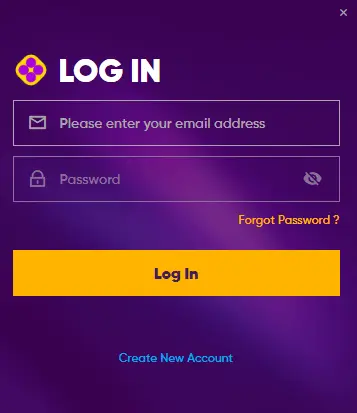
Small details matter. An extra space copied with an email address, an incorrect keyboard layout, or an old password can produce a failed attempt without indicating any serious account problem. Repeatedly guessing passwords, however, is not a sensible recovery method.
The same principle applies on mobile. There is no need to create an additional account solely to use another phone, tablet, or computer. If the interface displayed to you differs from For an older guide, follow the current Play971 account flow instead of relying on screenshots from third-party pages.ndently check whether online betting or casino activity is permitted in their jurisdiction before registering, depositing, or playing.
Password Recovery
The public Play971 pages reviewed for this guide do not expose enough detail to document a fixed step-by-step password recovery sequence without making assumptions. Therefore, it would be misleading to state that a particular code, link, SMS process, or verification method is always used.
If a password is no longer accepted, first confirm that the correct account email is being entered. Then use the recovery function presented in the current Play971 login environment, if available. Where recovery cannot be completed from the interface, contact Play971 through its recognized support channels rather than following instructions from an unsolicited message or third-party website.
A new password should be unique. Reusing the same password for gaming, personal email, banking, and social accounts creates unnecessary exposure: a compromise elsewhere could provide an attacker with credentials to test against the Play971 account.
Do not send a full password or one-time security code to anyone claiming that their identity is required to restore access. The Play971 Terms include specific sections addressing phishing and scammers, so unusual requests for credentials should be treated cautiously.
If access cannot be restored through the normal account tools, stop repeated attempts and use official support.
Registration and Verification
The current Play971 registration process is divided into four visible stages: E-mail Account, Personal Info, Address, and Password. The registration page also states that the email address becomes the login credential and requires users to confirm that they are at least 21 years old and accept the applicable Terms and Privacy Notice.
| Registration area | What the current interface confirms | Practical point |
| Email account | Email is used as the login credential | Use an address you control |
| Personal information | Personal details form part of registration | Enter accurate information |
| Address | Address information is a separate registration stage | Keep details consistent |
| Password | Password setup completes the visible flow | Use a unique password |
| Eligibility | Users must be 21+ | Do not register if ineligible |
| Location | Geolocation must be enabled | Allow the required location check |
Accuracy matters because Play971 processes personal data as part of operating accounts and providing its regulated services. Its current Privacy Notice identifies Coin Technology Projects LLC as the data controller and explains that personal data is collected and processed in connection with use of the platform.
The publicly accessible pages reviewed here do not provide a universal list of KYC documents or promise a fixed verification time. Users should therefore follow only the verification requests actually presented to their account. Do not assume that another customer’s document request will necessarily be identical to yours.
Before submitting information, check that it is accurate and that any requested document is being provided through the recognized Play971 environment.
Geolocation and Access Restrictions

Location verification is a central part of account access. The current registration, casino, and sportsbook pages display a notice explaining that customers must enable geolocation so the system can check whether they are playing from a permitted location.
This means a correct email and password may not be enough to use all functions if location permission is disabled. A mobile browser or application may need access to the device’s location services before the eligibility check can complete.
If location verification is not working, review the following points:
- make sure location services are enabled on the device;
- confirm that the browser or recognised Play971 application has location permission;
- keep the operating system and browser current;
- avoid configurations that interfere with accurate location detection;
- Confirm that you are accessing from a jurisdiction where the service permits participation
- Contact official support if the location check continues to fail.
Trying to bypass the check through a second account, an unofficial application, or misleading location data is not an appropriate solution. The GCGRA states that commercial gaming in the UAE must be conducted through properly licensed operators, while Play971 itself states that users from restricted jurisdictions are not permitted to register or use the platform.
If access changes while travelling, verify the rules applicable to your actual location before continuing.
Account Security
A regulated account can still be compromised if the user gives away the credentials. Security, therefore, begins with several ordinary habits: checking the access point, protecting the email account used for login, keeping devices updated, and refusing requests for secret authentication information.
Play971’s Privacy Notice states that the platform processes personal data in connection with its service and includes a dedicated section on safeguarding that information. Its terms separately address privacy, cookies, viruses, phishing, and scammers. Together, these materials make account protection part of the wider service framework rather than an optional extra.
Avoid signing in through links received in unexpected messages. A fraudulent page can reproduce a logo and login form remarkably well. Before entering an email and password, verify that the access point is the one you intended to use. Likewise, do not install remote-access software because someone claims it is necessary to solve a login problem.
If you suspect that another person has accessed the account, change the password from a trusted device, secure the associated email account, and contact Play971 through a recognized support route. Do not delete account history simply because an entry looks suspicious; transaction and access information may be useful when explaining the incident.
Security should feel uneventful. That is usually a reassuring sign. browser access is the more conservative choice.
Login FAQ
The current registration page states that the email address supplied during registration is used as the login credential.
A failed login should be treated as an access or recovery issue rather than an automatic reason to create a duplicate profile. Use the recovery tools presented in the current interface or contact recognized support.
The current registration page and public platform information specify a minimum age of 21 years.
Yes. Current Play971 pages state that geolocation must be enabled so the platform can determine whether the customer is playing from a permitted location.
The visible registration process currently contains stages for an email account, personal information, address, and password. Exact fields should be taken from the live registration form rather than an older third-party guide.
Verification requirements can depend on the account and situation. The public pages reviewed for this guide do not provide enough information to state a single universal document list or guaranteed approval time. Follow only the requests displayed through the recognized Play971 account environment.
Check the email credential and password first. If they are correct but access still fails, use the recovery option presented by the current login interface or contact recognized support. Do not repeatedly guess passwords or send credentials to third parties.
Yes. The GCGRA’s current licensee register lists Coin Technology Projects LLC under both Internet Gaming Licensees and Sports Wagering Licensees.
Account access is ultimately about more than getting past a login screen. Use accurate registration details, protect the email associated with the profile, keep location services available where required, and treat unexpected requests for credentials with caution.
Gaming also involves financial risk. Keep a separate entertainment budget, use available player controls, and stop if gambling begins to affect finances, responsibilities, or wellbeing. A secure login protects the account; responsible limits protect the person using it.